
PolyDev — AI coding agent, Linux terminal and IDE for Android. Build from
your phone.

An AI coding agent with a real Linux terminal, code editor, live preview and one-tap deploy. Build and ship web apps without a laptop.

# Ask in plain language
› Build a sales analytics dashboard
# The agent writes your React project
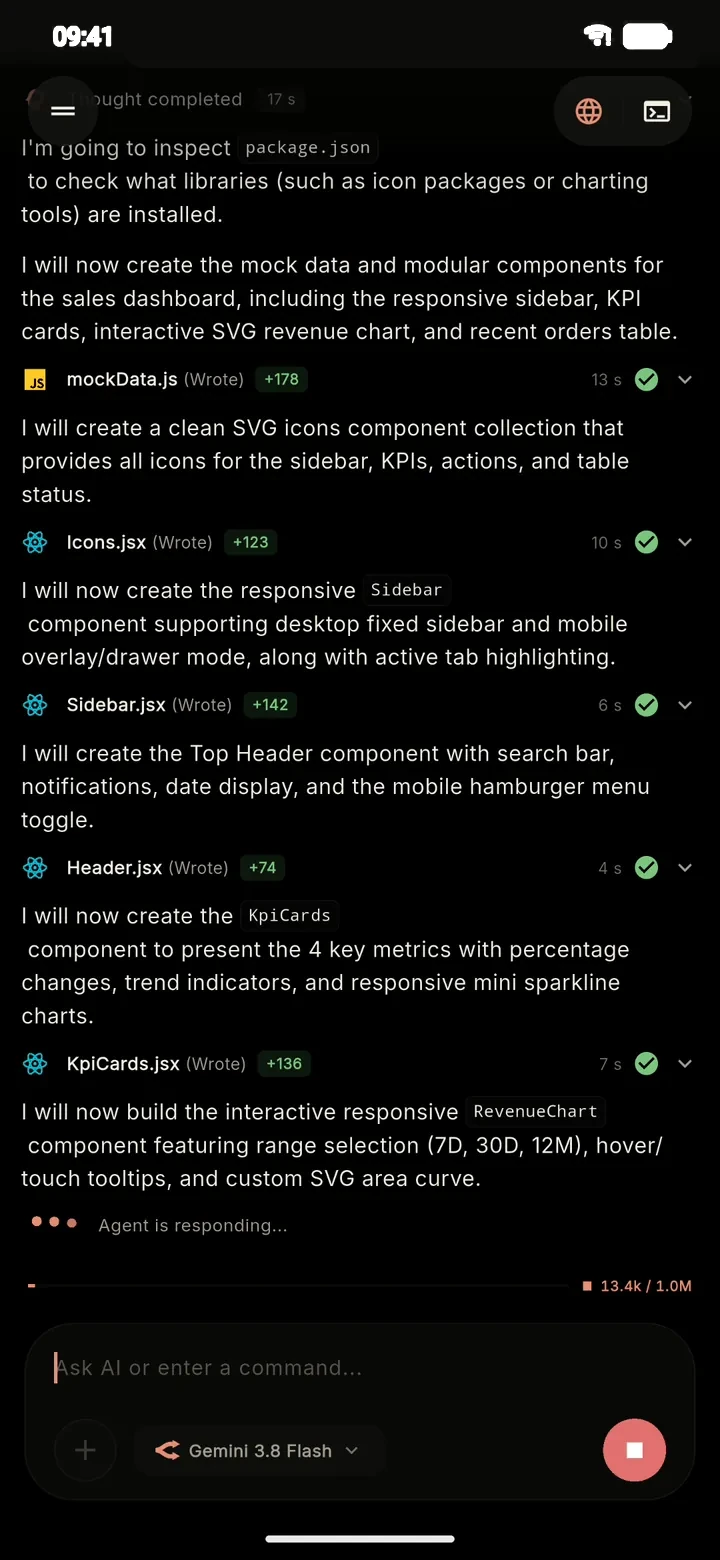
write src/components/Sidebar.jsx   +142
write src/components/KpiCards.jsx  +136
write src/App.jsx                  +134
Google PlayGet it on Android App Storecoming soon

# workspace

A developer workspace

Not a chatbot that pastes snippets — an agent with hands. Write, run, inspect and ship inside one app, on the device. Real screens, not mockups.

  1. AI agent

    Ask in plain language. The agent inspects your directory, performs multi-file edits and resolves bugs in place — not in a detached chat window.

    • Creates, edits and deletes files across the whole project
    • Plan review for big changes, instant execution for small ones
    • Web search for current APIs and documentation
    • Multi-step loop that corrects itself from logs
    PolyDev AI agent writing React components and explaining each step
  2. Linux terminal

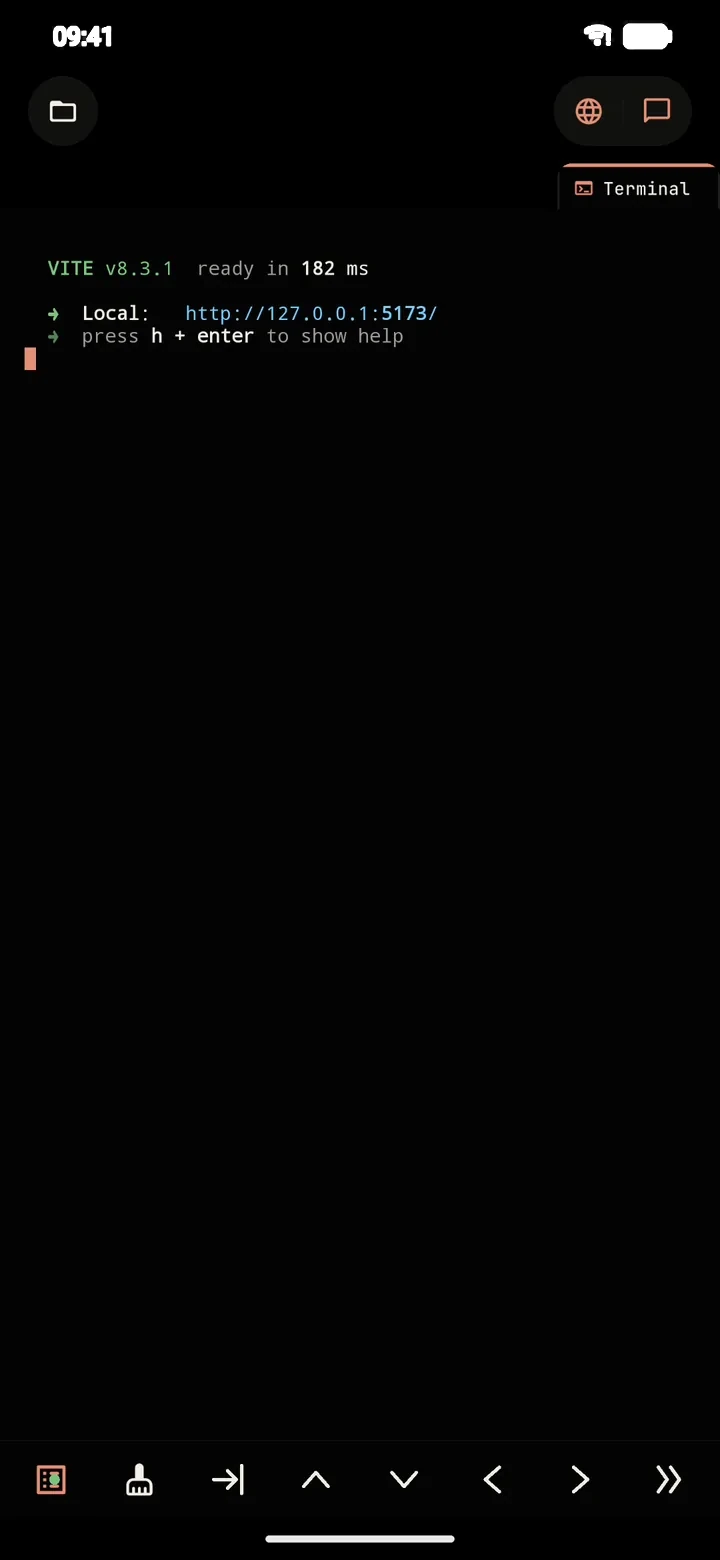
    A genuine Alpine Linux environment on Android through PRoot — no root, no remote server. Real npm, pip, composer and go.

    • Alpine 3.21 with Node.js 22, Python 3, PHP and Go
    • Runtimes install on demand when a project needs them
    • Vite, Next.js and other dev servers with hot reload
    PolyDev terminal running the Vite dev server
  3. Editor & Git

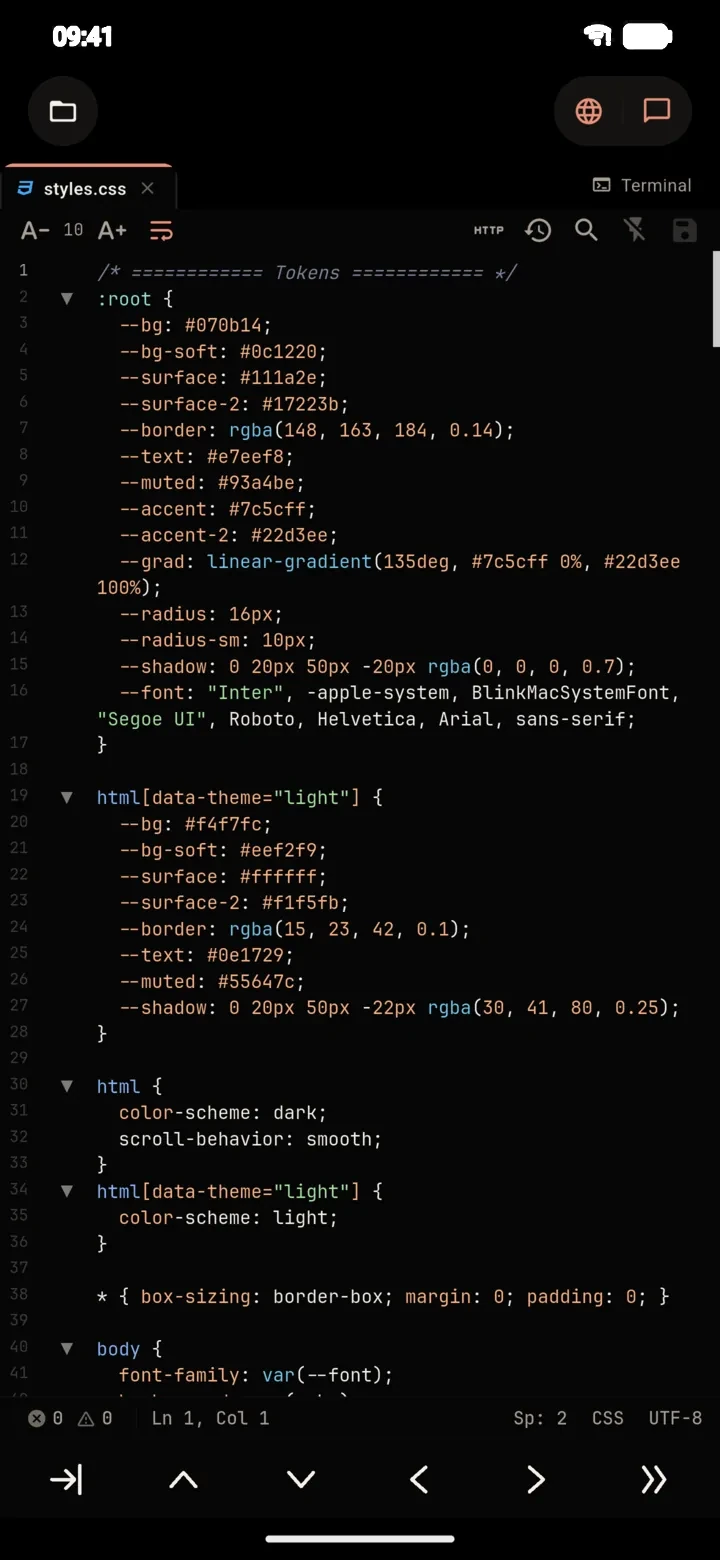
    Multi-tab editing with syntax highlighting, a shortcut bar for brackets and indentation, and a visual Git panel for staging, commits and diffs.

    • Tabs with auto-save and unsaved-change indicators
    • Stage, commit, push, branch graph and history
    • Review every AI edit as a diff before it lands
    PolyDev code editor showing styles.css
  4. Live preview

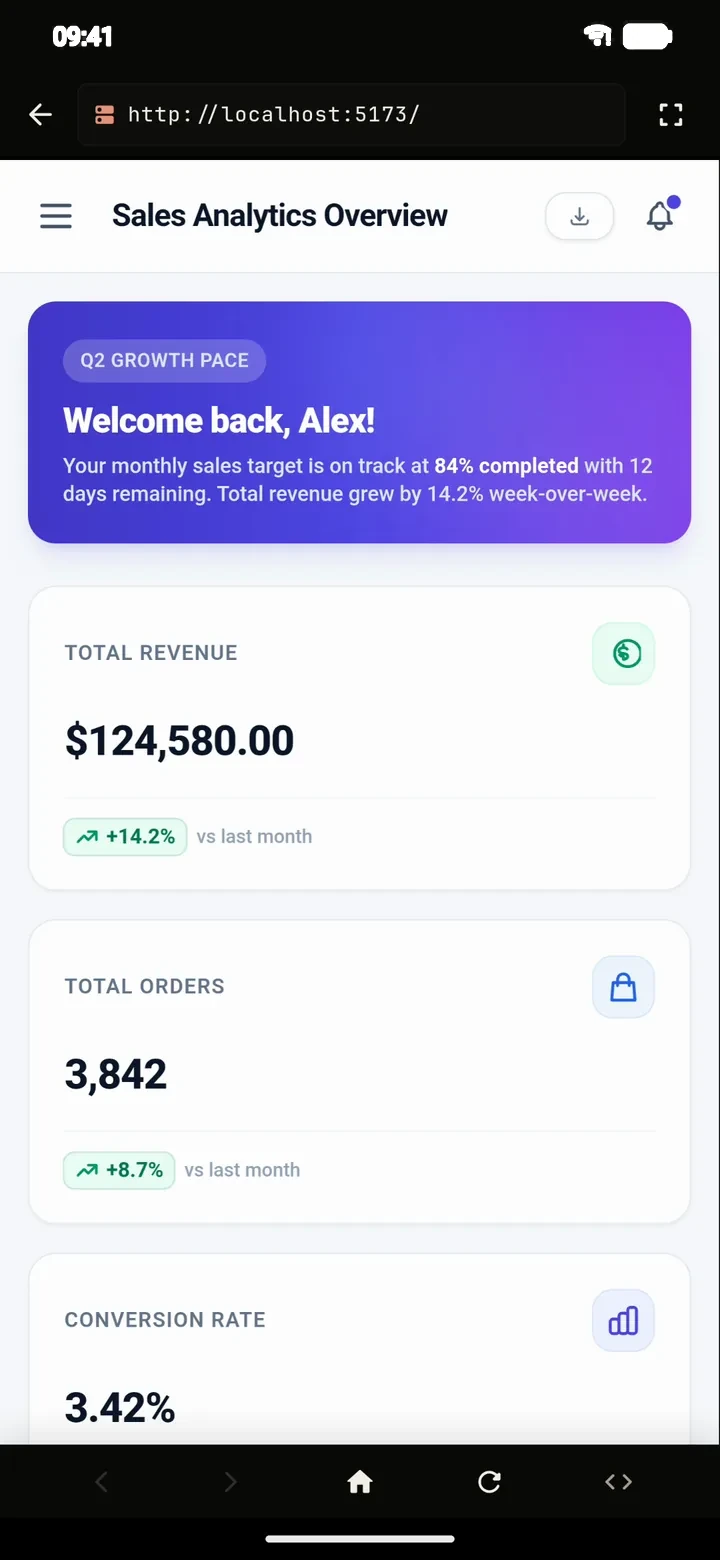
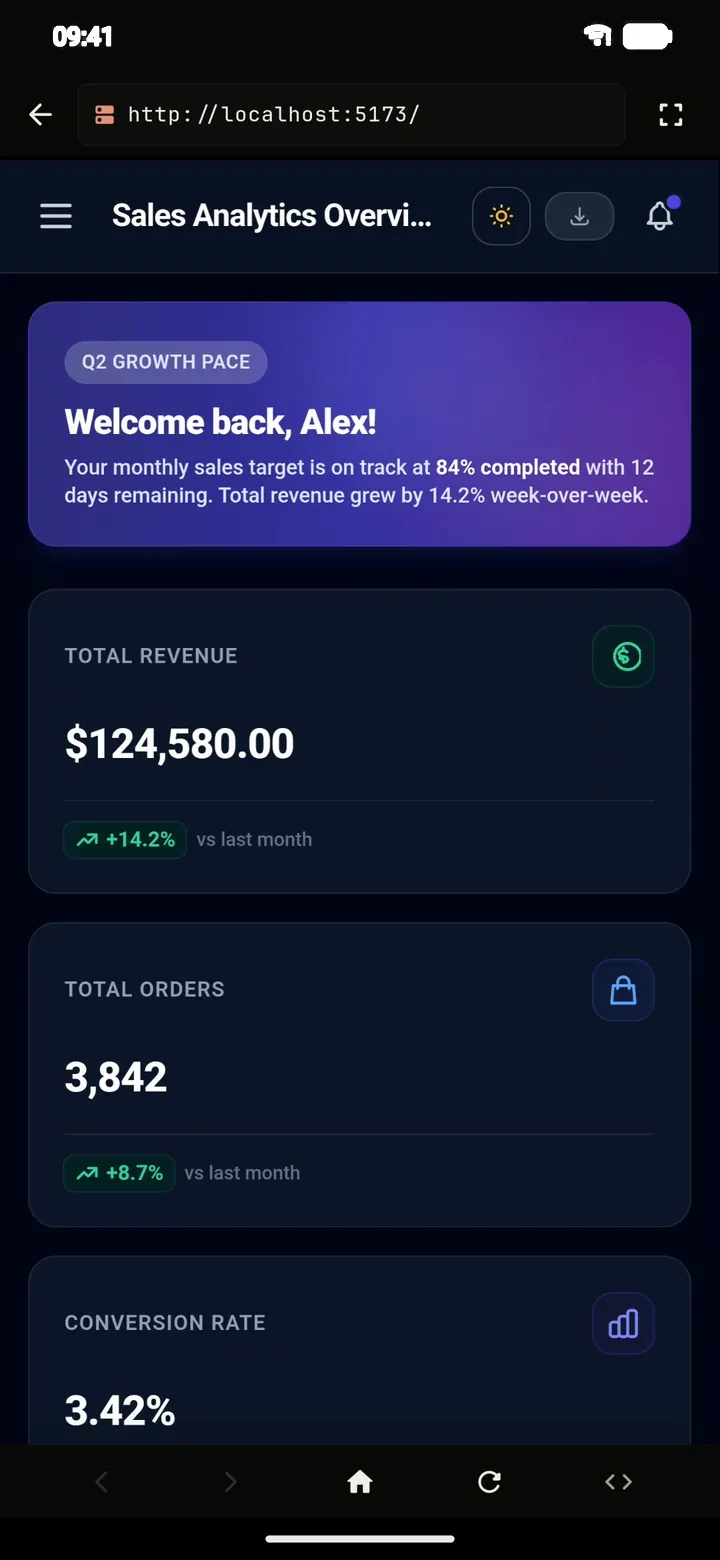
    Vite, Next.js or any dev server runs in the background on-device. Open it in the built-in preview, read the logs and manage running processes — without deploying anything.

    • Runs against the on-device dev server (localhost)
    • Ports, PIDs and one-tap kill for running processes
    • Works offline — no internet needed to preview
    PolyDev live preview of the React sales dashboard the agent built
  5. Iterate

    Ask for more and the agent edits its own code: “add a dark/light theme toggle” — a few seconds later it works in the preview.

    • Keeps the context of the whole project
    • Changes shown as diffs, file by file
    The same dashboard in dark mode after the agent added a theme toggle
  6. Files, templates & Git

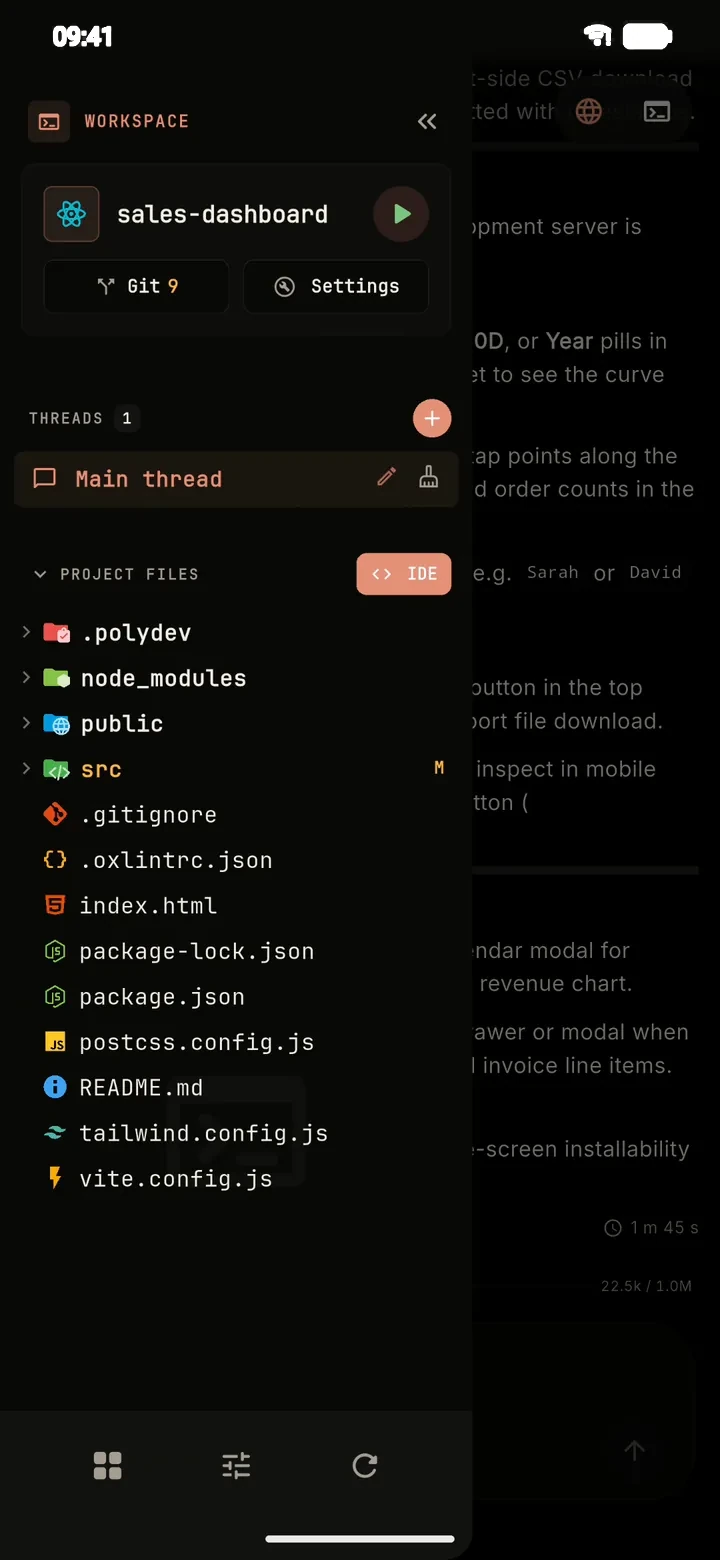
    Browse nested directories, start from one of 24 ready-made stacks or clone a public or private GitHub repository in a tap.

    • React, Vue, Svelte, Next.js, Express, NestJS, Go, bots, games
    • Built-in Git: stage, commit, push, history
    • Files stay on your device — no cloud copy
    PolyDev workspace with the project file tree and Git
  7. Usage & cost

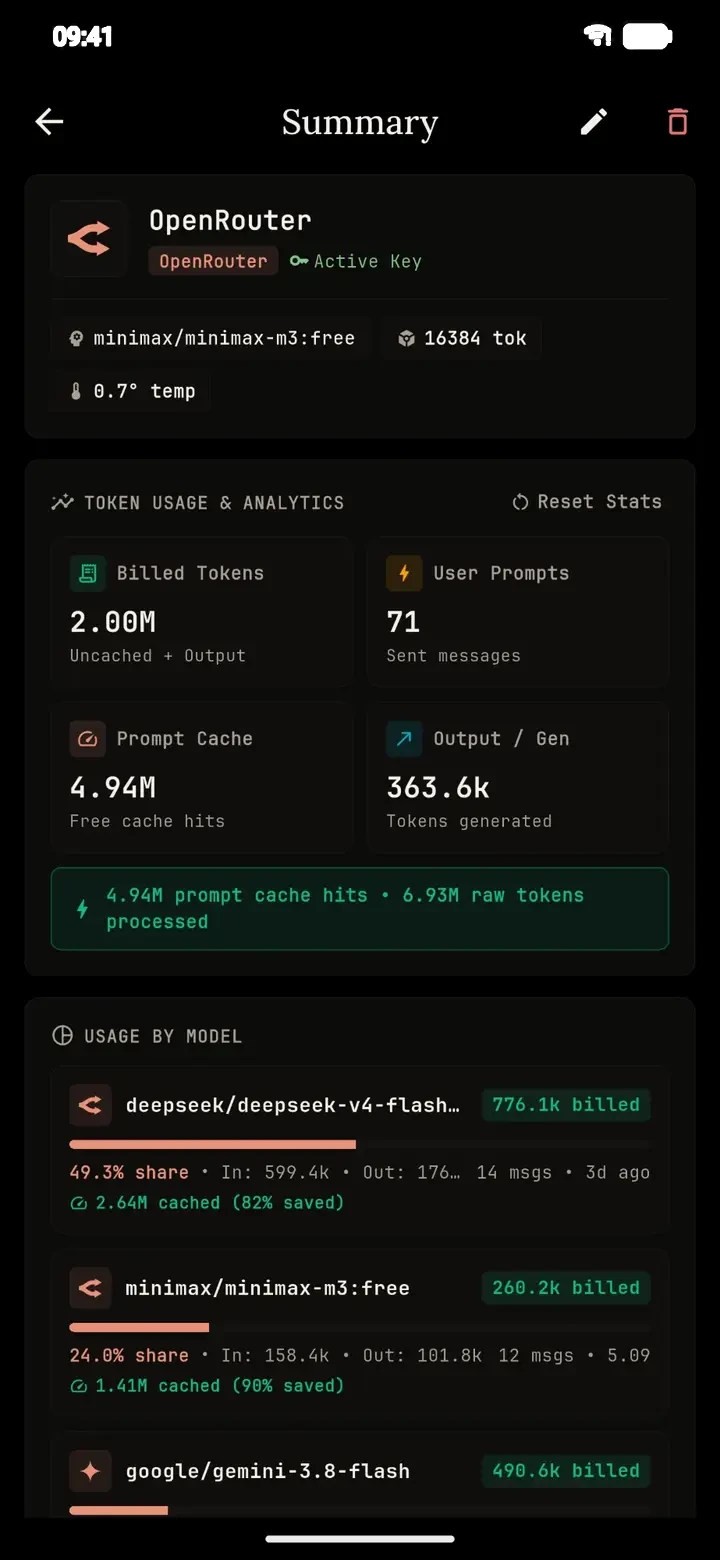
    Every request against your own key is tracked in real time: tokens, cost, cache hits and which model drives your spend.

    • Per-provider and per-model breakdown
    • See exactly how much prompt caching saves you
    PolyDev usage summary: billed tokens, prompt cache hits and usage by model
  8. Deploy

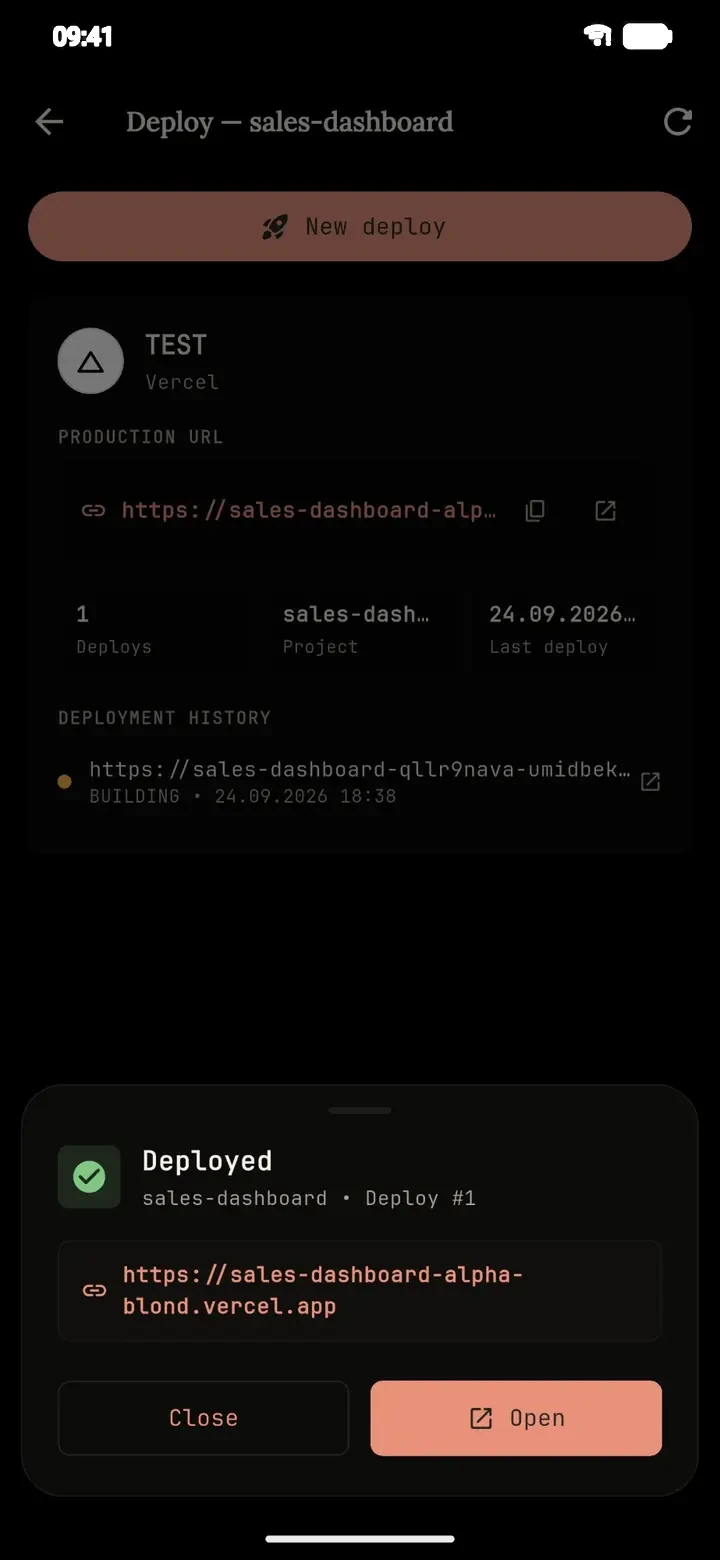
    One-tap deploy to Vercel or Cloudflare Pages with .env sync and deploy history. Android APK/AAB builds in the cloud. Supabase or Nhost backends without leaving the IDE.

    • Vercel · Cloudflare Pages · GitHub Actions · Expo EAS
    • Push to GitHub from the built-in Git panel
    The React dashboard deployed to Vercel from the phone

# models

Works with the models
you already use

Bring your own API key and pay the provider directly — no markup. Run local models with Ollama on your home server, or point PolyDev at any OpenAI-compatible URL with your own headers.

No key yet? The built-in free tier works out of the box — no card, no setup.

OpenRouter / Anthropic / OpenAI / Gemini / Mistral / Groq / Ollama / and more

Missing yours? Any OpenAI-compatible endpoint works.

Anthropic OpenAI Gemini OpenRouter Mistral Ollama Groq DeepSeek Hugging Face

free tier

Built-in models, no key needed

start coding in the first minute

usage · this session

22.5k tokens · $0.04

prompt cache hit 64%

custom endpoint

https://llm.home.lan/v1

your headers · your model

# how-it-works

How it works

Your phone is the whole machine: the agent, the files, the terminal and the preview all live on the device. Only the model runs in the cloud — the provider you choose.

Describe
Brief the agent the way you'd brief a colleague — a feature, a fix or a whole app. Or pick one of 24 templates.
Approve
For larger tasks the agent proposes a plan. Edit it, then confirm. Every change is shown before it applies.
Watch
Files are written, packages installed and the dev server boots in the on-device terminal. Open the live preview.
Ship
Deploy to Vercel or Cloudflare Pages in one tap, push to GitHub or build an Android APK.

# story

Why I built PolyDev

“Those who want to, look for opportunities. Those who don't, look for excuses.”
  1. 2012Nokia 6303i Classic · WAP site builder
  2. →HTML · CSS
  3. →PHP
  4. →JavaScript
  5. →Flutter · Python
  6. 2026PolyDev

In 2012 I didn't have a computer. I had a keypad Nokia 6303i Classic and a huge desire to make something of my own on the internet. On it, in a WAP site builder, I put together my first website. A tiny screen, buttons instead of a keyboard, slow mobile internet — there were plenty of reasons to give up. But I looked for opportunities, not excuses.

Then came years of teaching myself: HTML and CSS, then PHP, then JavaScript, later Flutter and Python. Nobody held my hand. I learned, made mistakes and built projects. More than 14 years have passed since, and web development has been my work all that time.

I remember well what it's like to want to create when all you have at hand is a phone. And I know there are millions of such people today: students, beginner developers, everyone who has no powerful computer but has an idea and the will.

PolyDev is the tool I was missing in 2012. A full development environment right on your phone: an AI agent that writes and edits code with you and explains what it does, a real Linux terminal, a live preview, and publishing to the web in a couple of taps. It used to take a computer to start programming. With PolyDev, a phone and the desire are enough.

PolyDev keeps evolving: I improve it every day, test it on real tasks and listen to its users. The road I started on a keypad Nokia goes on, and now I want it to be easier for everyone taking their first step today.

If you want to — look for opportunities. One of them is already in your hands.
— Umidbek, the maker of PolyDev

# faq

FAQ

Is PolyDev really free?

Yes. The app ships with a built-in free AI tier so you can start coding immediately with zero setup. For heavier use, connect your own key from any supported provider and pay that provider's real rate directly — no markup from us. Pro and Ultra raise project and provider limits; prices are listed in Google Play.

Do I need to root my phone?

No. PolyDev runs a genuine Alpine Linux environment through PRoot. It works on stock Android with no root, no companion app and no remote server.

Which languages and runtimes work in the terminal?

Node.js installs automatically on first launch. Python, PHP and Go are added on demand when a project uses them. You get real npm, pip, composer, go and apk. Git lives in the app itself — a visual panel to stage, commit, push and browse history, no terminal commands needed.

Where does my code live?

On your device's local storage, not on our servers. When the agent works on a file, the relevant content is sent to the AI provider you configured (or the built-in free tier) so the model can read and edit it — the same as any AI coding tool. Files otherwise leave the phone only when you push to GitHub or deploy.

Which AI providers can I use?

OpenRouter, Anthropic, OpenAI, Google Gemini, Mistral, Groq, Cerebras, NVIDIA NIM, Hugging Face, SiliconFlow, GitHub Models, Ollama (local or cloud), OpenCode Zen — or any custom OpenAI-compatible endpoint with your own headers.

Can I deploy real projects, not just prototypes?

Yes. One-tap deploy to Vercel and Cloudflare Pages with automatic .env sync and deploy history, plus cloud APK/AAB builds for Android via GitHub Actions or Expo EAS.

Does it work offline?

The terminal, editor and local dev server keep working without a connection. Only the AI agent needs internet to reach your model provider.

Why do I need to sign in with Google?

Sign-in is used to manage your subscription and limits and to sync settings between devices. It does not upload your projects.

PolyDev app icon

Stop coding
only at a desk.

Install PolyDev, describe your first task and watch the agent do it — terminal, editor and deploy included. Free to start, no card required.

Google PlayGet it on Android App Storecoming soon